
Research, Citations and Use of AI
AI Guides
Academic integrity around the use of AI is a rapidly evolving field. Always check with your teacher on what is appropriate use for the assignment or task you are completing.
See the SD62 AI Guide here.
Citation Guides and Generators
See below for resources to create citations, format your research paper, and learn how to give credit to your sources.
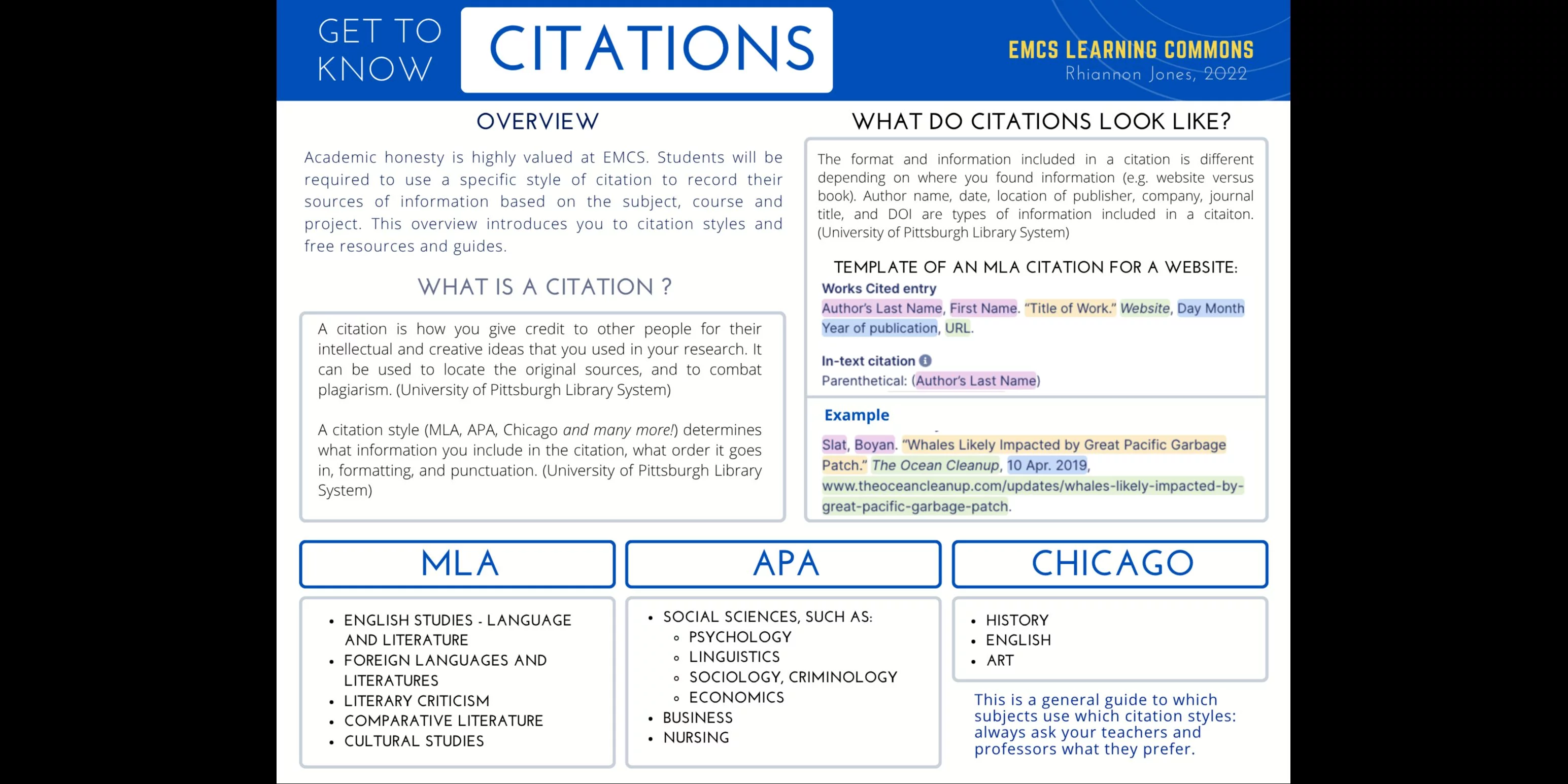
Not sure what citations are? See image at bottom of the page for an overview.
Paper Templates in Google docs - make a copy for yourself to edit:
Citation Guides
Purdue OWL (Online Writing Lab)
Your go-to resource for research, academic writing, and citation formatting. Includes comprehensive, free guides to APA, MLA, and Chicago styles, with examples of in-text citations, reference lists, and paper formatting.
The official APA guide to citing books, articles, websites, videos, social media, and many other source types. Best for checking the details of an APA 7 citation.
The official MLA resource, with interactive templates, a citation-building tool, and answers to common questions about MLA formatting.
Chicago Manual of Style: Quick Guide
An official guide to Chicago-style citations, including footnotes and bibliographies. Useful for history and assignments that require Chicago style.
Citation Generators
Citation generators help you create formatted citations quickly. You may still need to correct missing or inaccurate information. The key is to find one that works for you, and use it consistently.
Google Docs Citation Tool
A built in tool so you can create in-text citations and bibliographies directly in Google Docs. Supports APA 7, MLA 8, and Chicago 17 Author-Date. It does not support every citation system or the latest edition of every style. Watch this tutorial video to learn how to use the tool.
Scribbr Citation Generator
Has great visual examples and guides for APA, MLA, Chicago, and Harvard styles. You can search for sources by title, URL, DOI, or ISBN, and export your references to Word.
Other generators include…
ZoteroBib (no account required, ad-free)
MyBib (ad-free)
Using AI for Citations
AI can help format citations, but it can also invent sources or make mistakes. Make sure it exists, and that all details (author, date, etc.) are correct.
Check formatting: Use a trusted citation guide, such as Purdue OWL.
Read original sources: Don't cite sources you haven't checked.
Follow your teacher's AI-use rules.
Golden rule for researching online: look at multiple sources!
Your best tool for digital research is lateral reading: scan across 4+ sources to confirm information is accurate.
See our school databases here.
Wikipedia can be a place to start your research, but is not considered an academic source to use for school.